





Spotify and YouTube Music are convenient until you start noticing the cracks. Tracks disappear when licensing deals fall through, algorithms push convenience over your own preferences, and anything you download is just a temporary rental you don’t really own. If you’ve been frustrated by any of that, self-hosting your music library is worth looking into. There’s a great app that runs on surprisingly modest hardware while giving you full control over your collection, your metadata, and your listening habits. If you’re frustrated with Spotify, it’s time to switch.
This Streaming Service Is the Best Way to Find Unique New Music
If you’re done with Spotify’s lacklustre curated playlists, give this a whirl instead.
The limitations of mainstream music platforms
Streaming services are just a rental model that can fail at any time

Music streaming was supposed to make things easier, but many people are finally hitting the walls that come with apps like Spotify or YouTube Music. These downsides show that we don’t really own the music we pay for. We’re renting access to a catalog that changes based on licensing agreements. So none of it is yours if you decide to quit Spotify for good.
Even worse is that when a contract expires or a legal dispute happens, albums and songs can just vanish overnight, leaving greyed-out dead links in your playlists. Even music that stays available can be unexpectedly swapped out for a remastered version that breaks original metadata or doesn’t sound right without the effects that time gave them.
Besides that, if you try to add your own locally downloaded files to Spotify, you’ll see how messy and unreliable it is. This is especially so when syncing those files across multiple devices. I’ve had issues on YouTube Music where podcasts I downloaded wouldn’t even resume at the right spot.
Spotify, on the other hand, forces podcast recommendations onto your home screen with no way to hide or remove them, so you’re stuck looking at episodes you’ll never listen to. That’s not to mention the mandatory shuffles, inability to scrub tracks, broken queue systems that play random recommendations instead of your actual queue, and ads that keep getting more common.
Then there are the recommendation algorithms, which aren’t always looking out for you. They usually suggest songs that make the company money instead of helping you find music you’d actually like. This is an issue even on Spotify Premium, where you don’t get ads but you do deal with music picked for you. The only way to escape this is to own a local, self-hosted library. Switching to your own server lets you take back control and stop renting your music forever.
When you self-host, your music lives in local files that you completely own, meaning no outside entity can ever take away your access, alter your tracks, or monitor your listening habits for profit. Your collection stays yours entirely, always accessible, and completely untouched by licensing expirations or sudden corporate policy changes.
Managing a private collection with Navidrome
A lightweight server that gives you back control over your metadata
Navidrome is a modern, open-source music server built for people who are tired of Spotify and YouTube Music. Older servers needed a lot of power because they relied on Java, but Navidrome is built with Go, which is much lighter.
Since it compiles into a single, static binary, it skips the massive memory requirements that usually come with hosting a large music library It usually runs fine on 128 megabytes of RAM, so you can put it on a NAS or a cheap Raspberry Pi without the lag you get with bigger apps.
Setting up Navidrome on Windows is pretty straightforward once you know where everything goes. Start by grabbing the latest version from the GitHub releases page and creating a folder called Navidrome at the root of your C: drive. Once you finish downloading it, move the navidrome.exe file into it. Then make a subfolder called music inside that same folder and drop your audio files in there. That’s what Navidrome will scan when it first starts up.
Since Windows needs administrator permission to write to the database, you can’t just double-click the executable. Open Command Prompt as an administrator, type cd C:Navidrome (you can change this to the folder you chose) to get into the right folder, then run navidrome.exe. You’ll see text start scrolling through the terminal. When it shows 0.0.0.0:4533, it’s ready.
Stick to C:/. I tried running it outside C:/, it does not work.
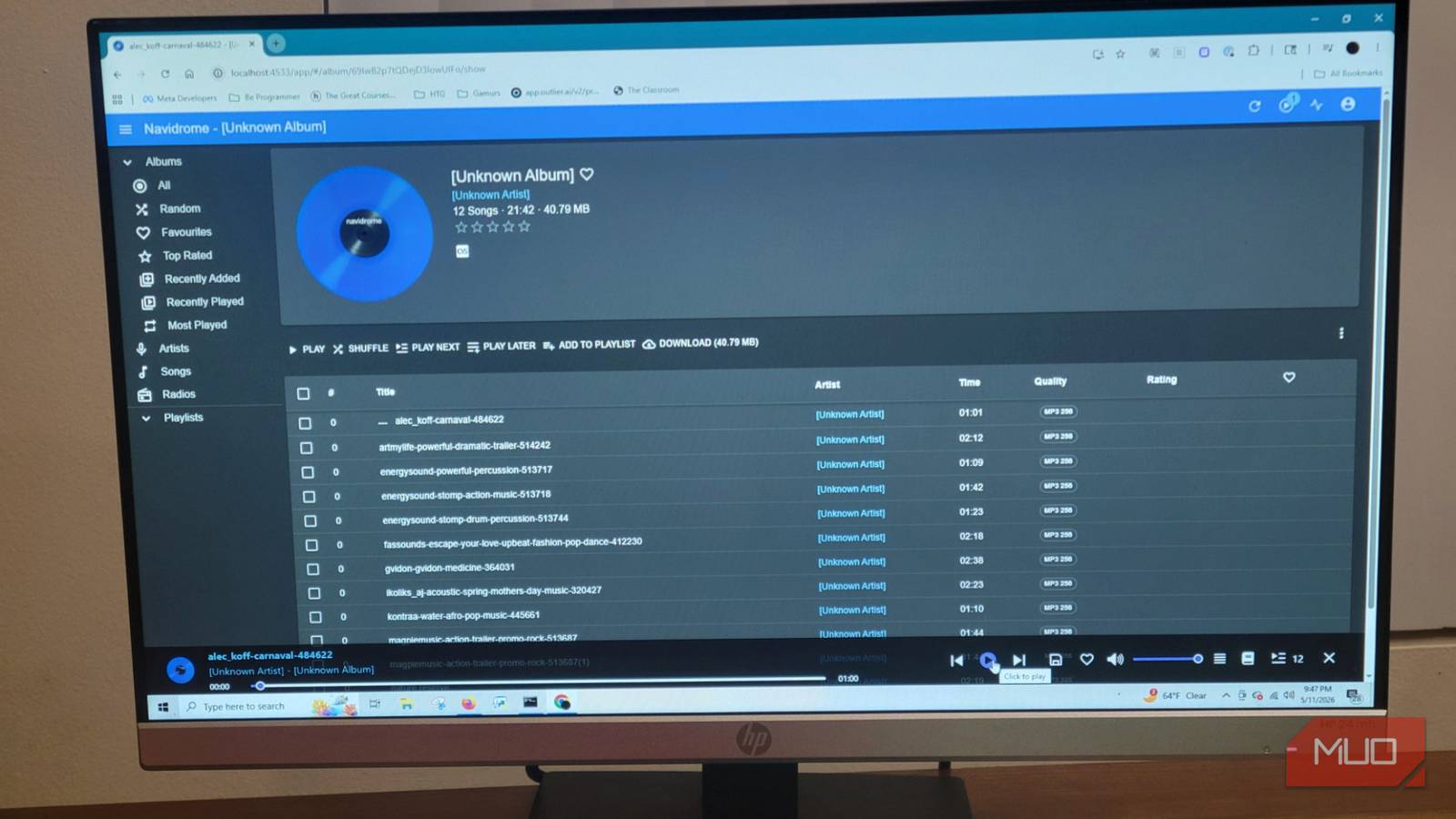
Open your browser and go to http://localhost:4533. Navidrome will ask you to create an admin account with a username and password before it lets you in. Once you do that, you’ll land on the full dashboard where your collection shows up.
One thing to keep in mind: that black terminal window needs to stay open the whole time you’re using it. If you close it, the server shuts down. Also, when you add music into your folder, it will automatically get scanned.
Expectations for the self-hosted experience
Trading polished algorithms for privacy and actual ownership

Moving from something like Spotify to a self-hosted music setup changes a lot about how you manage your music. If you’re coming from a big commercial app, you’ll have to change how you think about things a bit. Since these open-source platforms are built by volunteers instead of massive tech companies, their default web interfaces focus on function over form.
When you first set up a server like Navidrome, you’ll notice the native web application is clean and can do what you want. Unfortunately, it doesn’t have the visual polish or algorithmic features you’d find in a commercial app, because that requires paid employees who are dedicated to how the UI looks.
This is actually good for Navidrome because it leaves out the heavy tracking and suggestion tools that make big apps so slow. This is actually good for Navidrome because it leaves out the heavy tracking and suggestion tools that make big apps so slow. This keeps it lightweight, and it can run fast on my hardware, which is older. However, there are some third-party applications you can download.
By connecting to your server through a standardized protocol like the Subsonic API, you can use beautifully designed applications like Feishin for your desktop, Symfonium for Android, and Amperfy for iOS. These apps give you the smooth look you expect, along with things like offline listening, gapless playback, lyrics, and smart playlists.
The server basically handles storing and organizing your files in the background, while these third-party applications handle everything you actually see and touch. Sure, you’ll spend some time tagging your music files and maintaining your server, but that’s a small trade-off for actually owning what you listen to.
When you self-host, your files live on your own hardware, untouched by catalog rotations, regional licensing blocks, or price hikes. They are private, so there’s no invasive telemetry tracking every pause, skip, and location change to feed an advertising network somewhere. I think that’s what makes self-hosting worth it in the end.
It’s time to own your own library of music again
Self-hosting your music isn’t as complicated as it sounds, and the trade-offs are pretty reasonable once you’re set up. You’ll spend some time tagging files and maintaining your server, but in return, you get a library that nobody can alter, remove tracks from, or monitor for profit. Navidrome handles the backend well, and the third-party clients that connect to it are polished enough that you won’t miss the commercial apps as much as you’d expect.

- OS
-
Windows, Linux, macOS
- Developer
-
Deluan Alves
Navidrome is a lightweight, self-hosted music streaming server that lets you stream your personal music library from any device.