




I’ve owned OLED TVs since 2015. Over the past decade, I’ve sweated over OLED burn-in for the longest time. Thankfully, my obsessive routines have so far prevented the threat of permanent image retention. Yet when it comes to my latest TV tech defect, there’s really no hard and fast way to fix the problem.
Color banding might not be nearly as well known as OLED burn-in, but for mega AV dweebs like myself, it’s an absolute thing. Color banding has semi-ruined some of my favorite PC games, yet if you know what TV settings and software measures to deploy, this defect can become a lot less offensive to your eyes.
What is color banding?
An explainer on this annoying visual defect
Unless you’re a colossal TV tech geek, there’s a good chance you might not know what color banding is. Let me correct that for you. Color banding is sometimes known as “posterization”. To use words with generally less syllables, it normally happens because your TV is restricted by limited color depth settings.
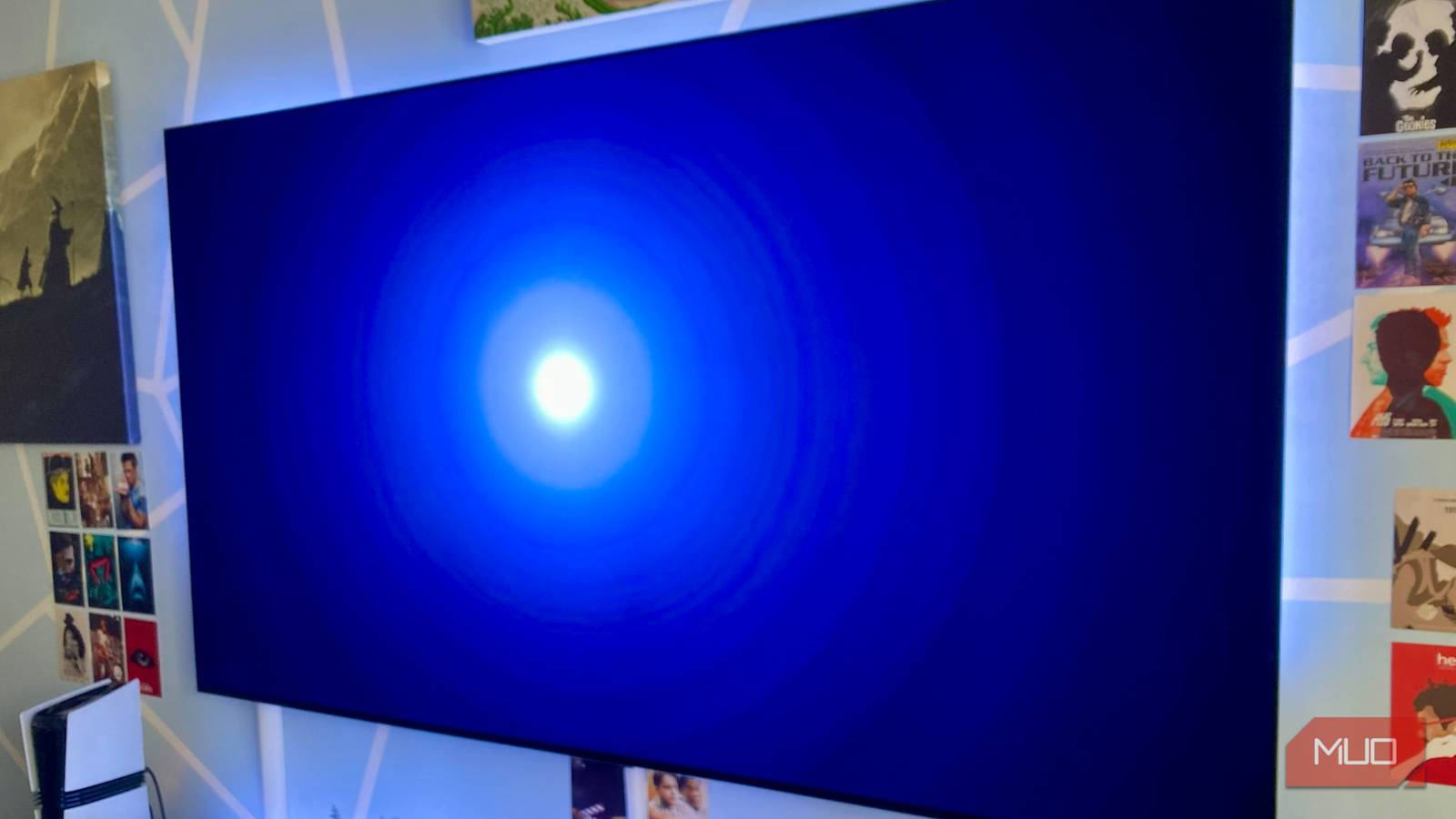
How does color banding manifest itself? While I hope the photos in this article will hammer home how pronounced this defect can be, in reality, many folks might not notice it.
The easiest way to spot color banding is when a normally smooth surface appears onscreen, but looks anything but smooth. Think of a blue sky or an ice hockey pitch. While a uniform background should appear without artifacts, color banding creates an obvious “stair-stepping” effect where it’s easy to spot the slight variations between similar color tones.
Color banding is a gradient problem. Smooth gradients should be the norm on modern TVs, but they’re absolutely not. Whereas consistent onscreen elements like skies or the pure green of an NFL field should look completely uniform on a modern television, they rarely do.
Depending on the bit depth your TV is capable of displaying, if you’re stuck with an 8-bit color TV that is regularly forced to show content that’s been mastered at 10-bit, color banding is basically unavoidable.
The causes of color banding
Lower-quality content makes banding more prominent

Color banding occurs because your TV or the content it’s displaying isn’t able to show smooth transitions between hue gradients. Generally speaking, the greater color bit depth your TV is capable of showing, the less color banding should be a factor.
Let’s go through a basic example. Say you own an aging TV that is restricted to 8-bit color accuracy. That works out at 256 shades per color. Now, if you then force that television to show 10 or 12-bit content, the discrepancies in bit performance are going to lead to those aforementioned stair-stepping effects. Color banding is not a permanent screen default, unlike OLED burn-in. It won’t rear its ugly head in every piece of content that you view, but when it’s bad, it’s genuinely as distracting as screen burn.
Color banding also surfaces when heavy video compression is involved. If you find yourself watching a sub-720p YouTube clip on a 4K TV, you’re all but guaranteed to face banding woes. The lower the bitrate of the content you’re watching, the more likely color banding will cripple your corneas. Low-quality video signals court this sort of banding due to problems with color-smoothing algorithms.
If you find yourself watching a badly encoded video or content with a low bitrate, no matter what AI-bolstered features your TV supports, color banding is going to be hard to avoid.
Can you get rid of color banding?
Tips for reducing this irritating effect
OLED burn-in is definitely not a myth, as is the case with color banding. Unlike burn-in, though, the latter defect can be reserved through TV settings tweaks, and if you’re a PC gamer, a useful piece of software.
Depending on what type of television you own, the manufacturer behind your current display may offer some solutions to color banding. Take my LG 3 OLED. This magnificent TV is three-years-old at time of writing, yet it still boasts a “Smooth Graduation” feature within its menus to help reduce the effects of color banding.
If you’re a massive Steam fan like myself and happen to own a PC that costs more than a car, there’s also a piece of software that can really help to reduce color banding. Say hello to Reshade.
This free, open-source piece of software can be a game-changer when it comes to HDR implementation with older games. For the purpose of this article, though, let me lay down some serious love for how it reduces color banding.
There are certain PC games that keep me up at night, the horribly visible stripes between gradients are so visible when color banding is in full effect. I’m thinking Reanimal, Resident Evil 7 and Starfield.
Once you install Reshade and enable its effects by either pressing the Home button on your keyboard or Fn + Left Arrow, it’s the “deband” preset you should focus on. From my experience, enabling this slider in Reanimal and Resi 7 significantly reduces color banding, particularly during near-black scenes.
Forcing your TV to adopt a film grain filter can also make color banding issues less obvious.
Color banding is an eyesore, but it can be (semi) fixed
Call me pedantic or obsessive (and you’d be right on both counts), but color banding on my OLED TV really does bother me. Is it as significant an issue as burn-in? Probably not, because fundamentally, color banding can occasionally be revered. Still, this visual defect does annoy my obsessive eyes, so if the tips above have helped you to reduce posterization, I’m glad.