


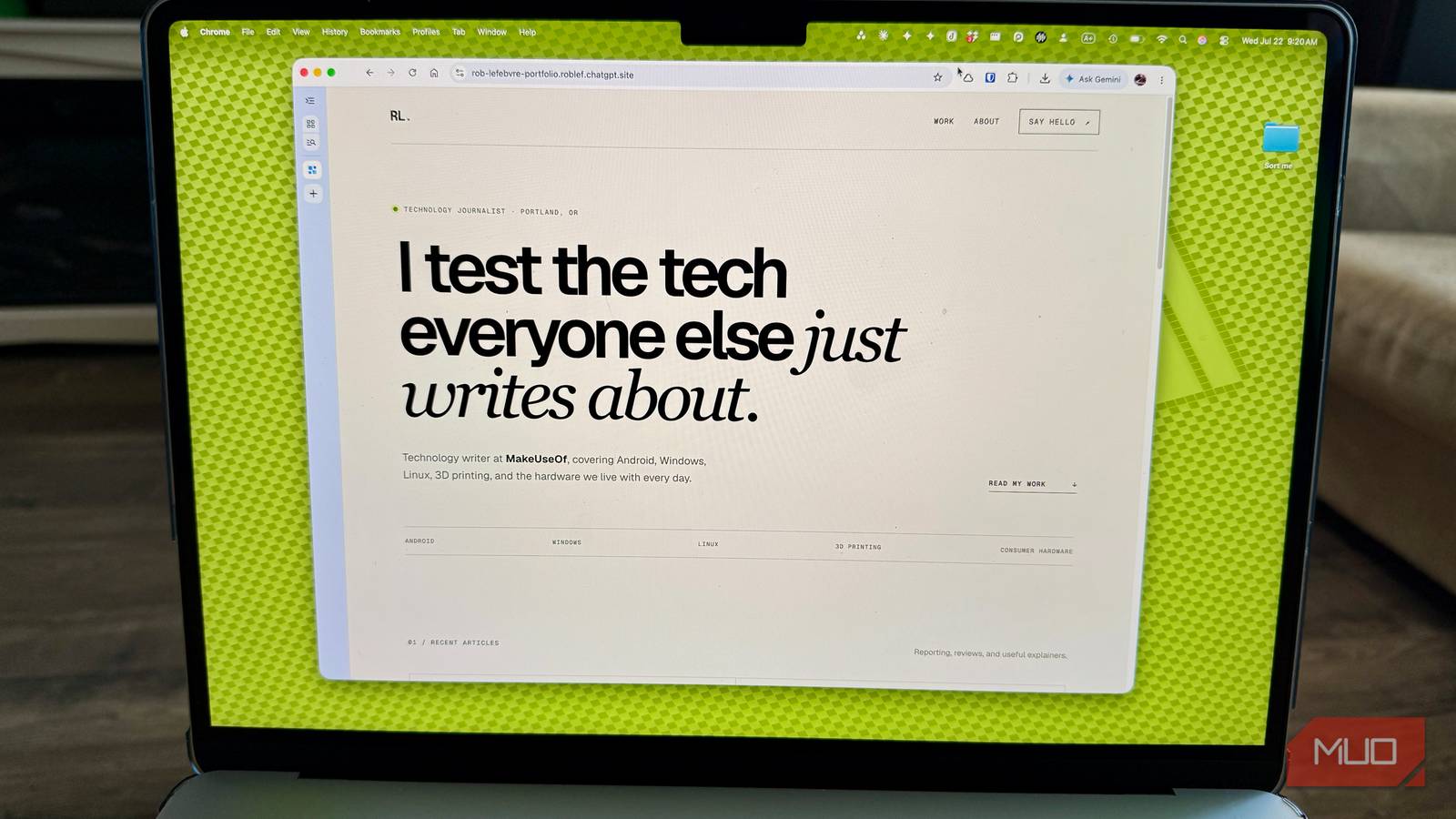
I assumed an AI website builder would make a basic page demo like we used to back in the HTML days: a single page, some placeholder Lorem Ipsum, maybe a button that doesn’t actually do anything. That’s been my experience with most “build a site with AI” tools since they showed up, including the Photoshop connector we tested inside ChatGPT a few months back, which was genuinely useful but clearly bolted-on. So when OpenAI folded a full site builder called ChatGPT Sites into its new Work mode, I wanted to know if it was something that could actually hold up as a real, working portfolio page.
Spoiler alert: it didn’t behave like a basic builder at any point, and it actually had opinions.
ChatGPT built my whole portfolio before I could blink
Eleven seconds, and it was already live
I described a personal portfolio site in one message inside Work mode, tagging @Sites to trigger it: my name, my beat, a bio, and placeholder sections for articles and contact info. I kept the prompt specific rather than vague. The same lesson from building a reusable ChatGPT prompt framework applies here too, since specificity is clearly what separates a usable result from a generic one. ChatGPT read the request, picked a visual direction on its own (editorial typography, warm off-white and near-black surfaces, a green accent), and built the whole thing. It worked for 11 seconds, according to its own timer, and then handed me a live link.
I never told it to deploy. I’d assumed, based on how OpenAI’s own documentation describes the feature, that Sites builds you a private preview first and waits for you to publish. Instead, it built, self-tested in its own browser preview, and pushed the finished site live in one uninterrupted pass. Access defaulted correctly to private, only visible to me, which I confirmed myself by trying to load the URL from a separate, logged-out browser and getting bounced with a flat 401 error. So nothing leaked. But if you’re expecting a pause between “build” and “publish,” don’t count on it, or build it into your prompt.
The content itself held up, too. It pulled my real career history (Lifewire, Engadget, Cult of Mac, my 15 years of writing online) without inventing anything, and it wrote a headline, “I write about tech for actual humans,” that I’d have happily kept.
The placeholder articles were too convincing for comfort
These read like real headlines, not filler

I’d asked for four placeholder article cards, expecting some “Article Title Here” boilerplate. Instead, ChatGPT created headlines like “What I learned from a month of failed prints” and “The honest guide to buying a mini PC,” complete with plausible one-line descriptions, in a voice close enough to mine that I had to double-check they weren’t real. To be clear, I’m not saying that’s a bad thing on its own. A portfolio demo with realistic-looking content is more useful than one full of gray boxes.
You need to be careful, though. This is a tool that, asked for a placeholder, produces something indistinguishable from a genuine byline. If you hand this to someone less careful about what “placeholder” means, or skip the step of swapping in real links before sharing the page, you might be publishing invented work under your own name and not notice.
It wouldn’t fake a feature it couldn’t actually build
Real infrastructure, not a placebo button

The site’s “contact form” was, at first, just a styled mailto: link, not an actual form. So I asked it to build a real one, complete with name, email, and message fields, with an email notification on submission. This is where ChatGPT stopped being agreeable and started being more direct about its limitations. It asked for a real email service, since sending mail requires one, then told me flatly that my personal Gmail address couldn’t work as a sender because I don’t control or verify Gmail’s own domain. When I offered the wrong setup anyway, it said plainly: “I can’t honestly call the form ‘working’ until one of those is available.”
After I said I didn’t have a mail API, ChatGPT found and searched Formspree’s own current documentation. It then walked me through the free setup myself rather than fabricate an API key or skip the step. Once I supplied a real Formspree endpoint, it wired up validation, spam protection, and a success message, explicitly noting it wouldn’t submit a test message itself so it wouldn’t generate an unwanted email in my inbox. It took a total of 2 minutes and 23 seconds for that entire integration to happen.
I filled out the form myself. The submission landed in Formspree’s dashboard instantly. The email notification took longer to show up, or so I thought, because my own inbox’s unsubscribe filter caught it. Chalk that up to my own system thwarting my own wants.
What I’d recommend if you try this yourself
You’ll need ChatGPT Plus at $20 a month; Sites is only available inside Work mode, which Free and Go accounts don’t get. Describe what you want built, use @Sites to trigger it explicitly, and give it real content rather than vague instructions, the way you would with any AI writing tool. Check the Share settings the moment it deploys, since publishing isn’t gated behind an extra step the way I expected. And if you ask for placeholders, look closely at what comes back. The site might be more convincing than you planned on.