



I’ll go out on a limb and guess you’ve probably heard of game streaming platforms like Nvidia GeForce Now and Xbox Cloud Gaming. Heck, you may even remember this failed Google product that everyone laughed at. If you know nothing about Amazon Luna, though, I don’t blame you in the slightest.
Launching back in early 2021, Luna is a cloud platform that no one is talking about. Based on my recent time with the streaming service, I totally understand why. Riddled with tech imperfections and often borderline maddening to use on an Amazon Fire Stick, I completely get the fact the Big A rarely ever shouts about Luna. That said, it’s not totally without its merits. But hoo-boy have I endured a rough time gaming on this compromised platform of late.
Nvidia doesn’t make TVs, but it made the best thing you can plug into one
The Nvidia SHIELD TV Pro is perhaps the most powerful streaming device you can buy
Amazon’s rarely talked about gaming streaming service
Cloud and not so proud

Despite the fact that Luna has been out for ages, you’re more likely to hear turkeys gleefully talking about Thanksgiving than you are Amazon customers bigging up Luna. It feels like the House that Bezos Built has barely promoted its cloud platform since it launched over five years ago. After messing around with Luna for a few days, I kinda get why it is Amazon’s dirty little secret.
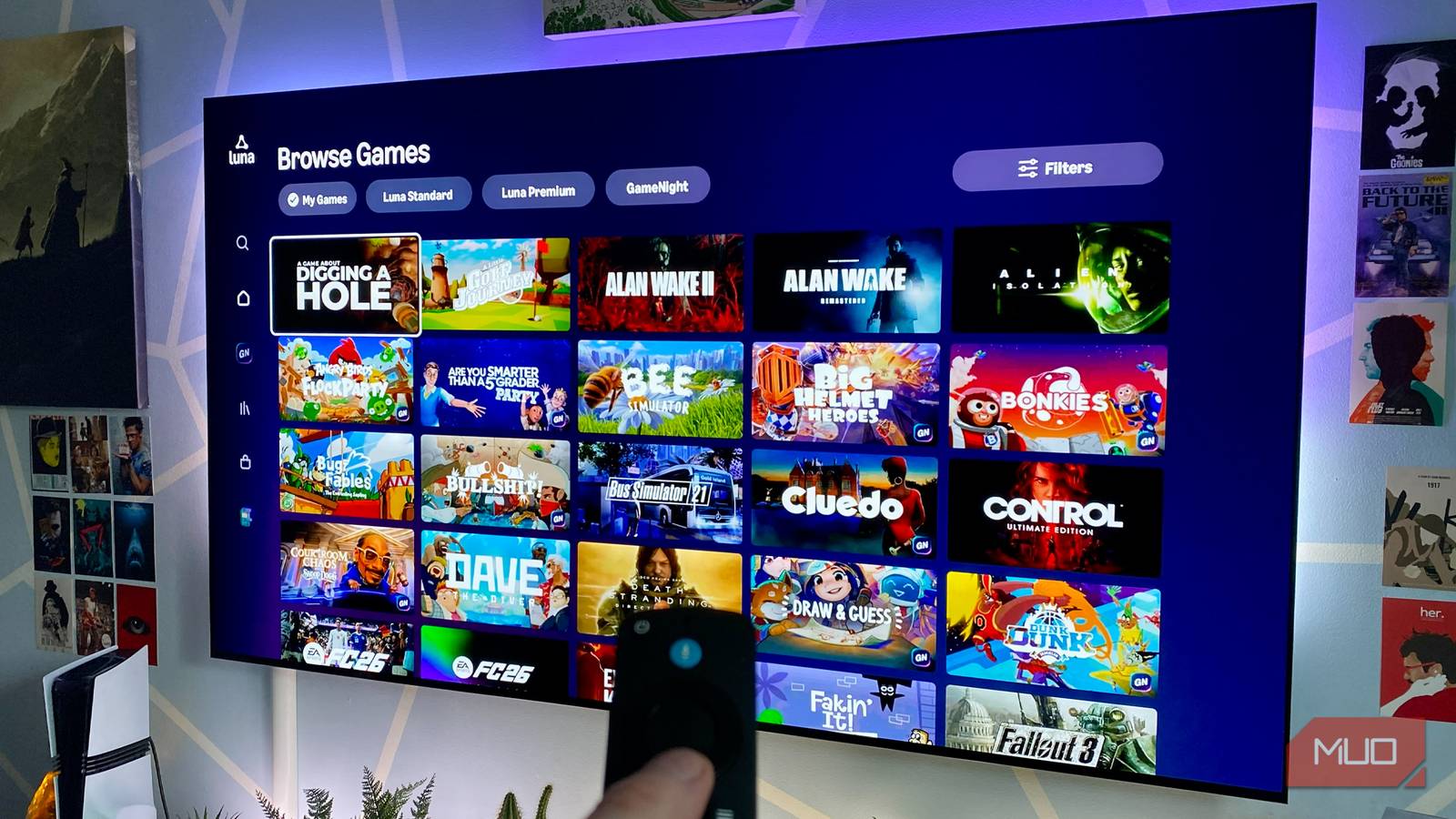
Let me break down the basics of what Luna actually is first, though. A somewhat cheap and cheerful cloud gaming service, its standard tier is free for Amazon Prime members. There’s also Luna Premium, which grants access to an expanded library of titles for $9.99 p/m, including high-profile EA hits like FIFA 26 and Star Wars Jedi: Survivor.
In terms of the tech behind Luna, you can stream up to 1080p/60 FPS in many titles (provided you have access to a 10Mbps connection). Amazon uses a Windows-based OS to power its platform, while its data centers use Nvidia Tesla T4 GPUs. That Team Green card allows Luna to tap into a level of gaming power that’s roughly on par with a PS4 Pro.
I’m going to throw heavy shade on Luna shortly, so let me quickly reel off some things I actually like about the service first. Its interface is reasonably clean and snappy! The standard tier has some genuinely excellent games, like Alan Wake 2, Indiana Jones and the Great Circle, and Hogwarts Legacy! You can pair a variety of gamepads with Luna fairly easily! Annnnd I’m just about done with the compliments.
Luna is ludicrously bad on my TV
A cloud platform so subpar, it barely functions
Hot dang, is Luna ever all kinds of problematic on my Amazon Fire Stick 4K Max. You’d think the company’s premier streaming gizmo would play nicely with its cloud gaming service, but that’s not been my experience at all. And while I have you, here are five mistakes that are secretly destroying your Fire TV Stick.
I commend Amazon for allowing you to hook up a DualSense or Xbox One pad to Luna rather than forcing folks to buy its $70 official Luna controller. I really do. But yikes! My trials and tribulations trying to get games to play ball with either my DualSense Edge or the base PS5 gamepad have been downright excruciating.
While the pairing process with both Sony controllers is smooth enough, almost every game I play on Luna through my Fire Stick steadfastly refuses to recognize their inputs correctly. Despite reconnecting both pads over Bluetooth several times, button mapping is always way off. Square acts as X! L1 acts as the Triangle button! Start is mapped to R3! Yeesh. Oh, and Luna doesn’t give you the option of remapping inputs. Obviously.
The least objectionable Luna experience I have on my Fire Stick is with the 2013 Tomb Raider reboot. Though image quality isn’t exceptional, it looks just about 1080p quality (albeit with visible video compression artifacts), and lag isn’t awful.
Yet as soon as I start to enjoy Lara’s opening, oh-so bleak cave escape, the game throws a QTE at me that demands both L2 and R2 be thoroughly bashed to keep Croft out of a spike pit. And wouldn’t you know it? Luna won’t recognize my DualSense’s triggers. Sorry, Lara.
Luna is better on a tablet
Cloud streaming on my iPad works reasonably well

In Luna’s defense, I’ve had an okay time with it on my iPad Pro (2024). A ringing endorsement, I know. On my tablet’s 13-inch (2572 x 2064 pixels) display, the compression artifacts that offend my eyes so easily on my 77-inch 4K OLED are harder to spot. Input lag also feels reasonable, even if it’s nothing compared to the high-end PC experience you get with Nvidia GeForce Ultimate — a cloud gaming streaming platform that’s so good, I regret buying my gaming laptop.
Most importantly, my DualSense actually works with Luna on my iPad. After I paired Sony’s pad with Apple’s slab, I had no real control issues. Button mapping works as it should; Luna recognizes the triggers on my controller, and I no longer have to scramble my brain, fretting over whether I should be hitting Start or L3 to pause the action. Again, another ringing endorsement.
The best thing I can say about experiencing Luna on my iPad? I’ve enjoyed a pretty serviceable experience with the opening hour of Indiana Jones and the Great Circle.
During the iconic Peruvian temple opening, image quality is decent, input lag is generally inoffensive, and hooray! All my DualSense’s buttons work as they should. I’m not saying I’m getting a PS5 or Xbox Series X level of quality out of Indy’s adventure. Still, it’s absolutely worth the precisely $0 Amazon is asking from me every month as an existing Prime subscriber who happens to own a Bluetooth-compatible controller.
I’m in no way surprised Amazon almost never talks about Luna. Its half-baked game-streaming platform is below average… and that’s when it’s working at its very best. I give credit to Amazon for offering Luna to Prime subscribers at no extra cost, but the $10 premium level is most assuredly not worth it. If you love gaming but have found yourself priced out on consoles and PCs due to RAMaggedon, the only cloud service that’s worth your money is GeForce Now.

- Dimensions
-
99 mm x 30 mm x 14 mm
- Connective Technology
-
HDMI 2.1
- Brand
-
Amazon
- Bluetooth codecs
-
Bluetooth 5.2 + BLE
- Wi-Fi
-
Wi-Fi 6
The Amazon Fire TV Stick 4K Max is a compact streaming device that plugs directly into your TV’s HDMI port, delivering fast, responsive 4K Ultra HD streaming with support for Dolby Vision, HDR10+, and Dolby Atmos. Powered by Wi-Fi 6 and Alexa Voice Remote, it offers smooth performance and hands-free control.