


There’s a reason why self-hosted media servers like Jellyfin and Plex are popular. There’s a reason why some people would rather buy Blu-rays and rip them rather than stream. And there was a reason why I attempted to build my own streaming box with Android TV on a Raspberry Pi: The smart TV market is one of the most aggressively monetized product categories in consumer tech.
But the prospect isn’t as hopeless as it seems. There’s an OS built specifically to serve TVs, and almost no one knows about it.
I plugged a Raspberry Pi into my smart TV and it changed how I watch everything
An old TV, a Raspberry Pi, and a setup that beats every streaming box on the market.
Meet Plasma Big Screen
KDE does for TVs what it did for desktops
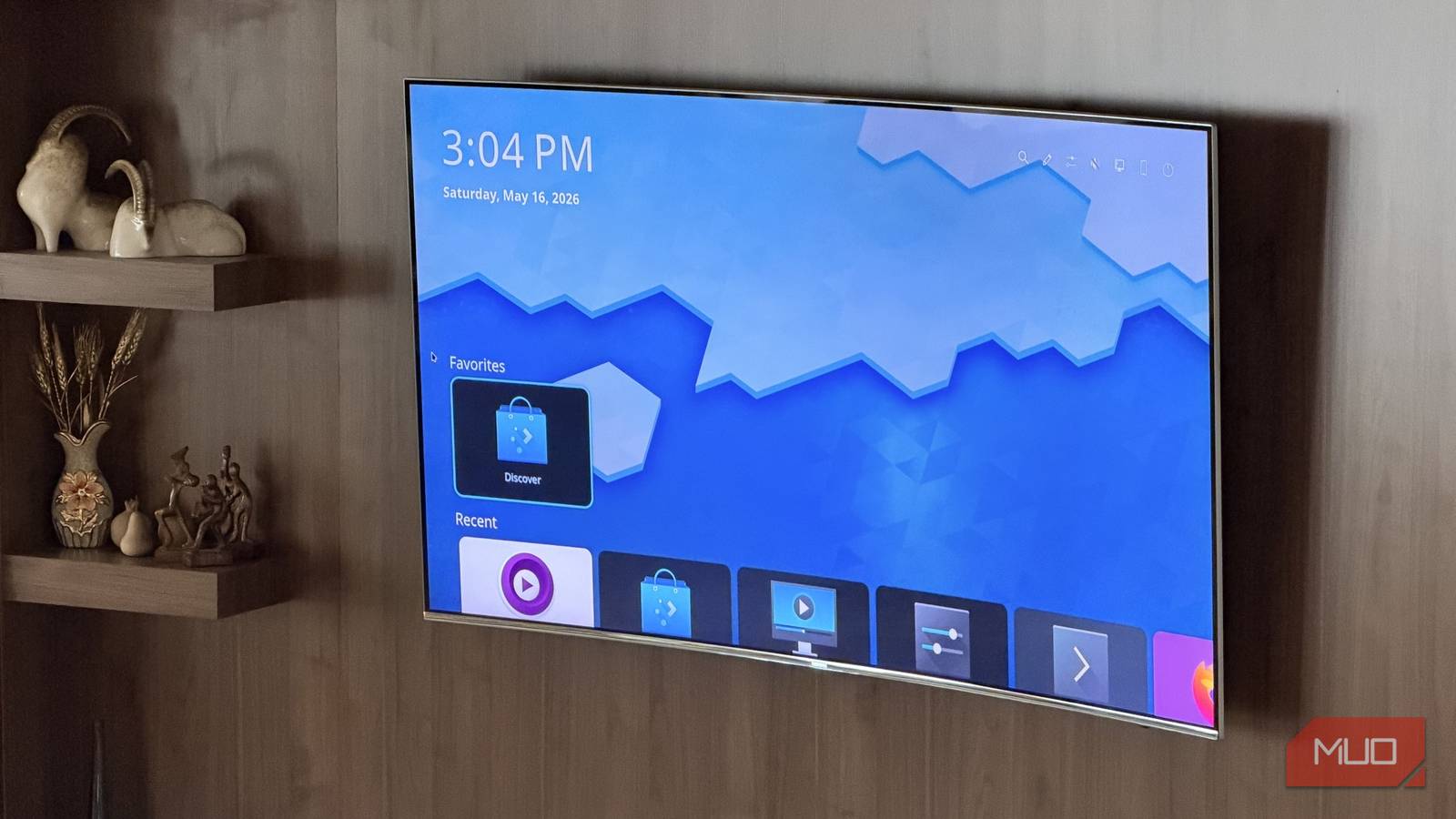
The OS mentioned in the title of this article is Linux. But it wouldn’t be a TV OS without KDE Plasma Big Screen, and that’s what I want to talk about. Big Screen is a project from the KDE community — the same people behind one of Linux’s best desktop environments — that brings Linux to TVs. Like everything Linux, the priority here is the user, not the advertiser or the manufacturer. In fact, there’s no advertiser here at all.
The project exists because KDE believes the principles that make Linux great on the desktop should extend to your living room. It started around a decade ago, went dormant, but has since been revived. Since it’s a desktop environment, you can install it on virtually any Linux distro.
It beats Android TV

Android TV — and its successor, Google TV — are usually framed as the open, developer-friendly alternative to Roku and other TV operating systems. In truth, they aren’t. Google has been distancing itself from the open-source movement, and more of what made Android great is being tied, day by day, to Google’s proprietary Play Services, which is definitely not open-source. The openness of Android is becoming largely cosmetic.
Don’t forget, you need a Google account to use Android TV. You can work around this by installing a LineageOS Android image, but streaming boxes don’t let you unlock the bootloader — and your TV definitely doesn’t.
Plasma Big Screen asks for none of that. No Google account and no sign-in. There’s no ad profile being assembled in the background, and nothing to display one either. The platform’s source code is publicly available for everyone.
It’s Linux

Just like you can install KDE Plasma on any Linux distro, you can also install Big Screen on any distro. My experience was with KDE Neon, which runs on Ubuntu. If it’s not available for your distro, you can build it from source.
My point here is that Plasma Big Screen is Linux. The conventional ceiling of a smart TV platform simply doesn’t apply to it. You’re not limited to an app store. There’s nothing you can’t sideload. And most importantly, all of your Linux apps work here too. It’s just a desktop environment.
Of course, there’s the issue of navigation — much like sideloaded Android TV apps, not every application is going to work well on a 10-foot display. But most of what you’d expect on a TV like this already has a TV-compatible interface: Kodi, Jellyfin, VacuumTube (a YouTube client for Linux), and the like.
In the long term, I believe KDE is betting on Kirigami convergence. Kirigami is KDE’s framework for designing apps that adapt across phones, TVs, and everything in between. Apps built on Kirigami will work just fine on Big Screen, essentially by default.
It can browse the web, and that’s more than enough

What does almost always work on big screens right now are web apps. Thanks to responsive design — and developers being so passionate (for lack of a better term) about React and Electron — almost everything is a web app these days. That means that regardless of your OS, if you can browse the web, you can use the app. All you need to do is save the page as a web app, and you’re set.
In fact, Spotify, Jellyfin, Discord, and a lot of other big names are nothing but a browser shell displaying a website. You can watch Netflix with an Electron app too.
There’s one catch
DRM, DRM, DRM

Speaking of Netflix — let’s talk about streaming. Commercial streaming services protect their content with Digital Rights Management, and that’s where Linux solutions like this have historically run into trouble. The dominant system is Widevine, Google’s DRM, which operates across different security tiers depending on the platform.
On Linux, Chrome and Firefox both carry Widevine L3, which is the lowest security tier. That means Netflix, Disney+, and Apple TV do work in a browser on Plasma Big Screen — just not at 4K. You’re capped at 1080p.
4K streaming on Windows works because of Microsoft’s PlayReady DRM, which supports higher-tier certification and is deeply integrated into the OS. There’s no Linux port of PlayReady, and there’s no realistic path to one. DRM is by nature closed-source, and Linux is by nature open-source. They just don’t go together.
This is the same problem I ran into with my Raspberry Pi Android TV setup. You can’t have 4K Netflix without proper DRM, and I don’t think we’ll ever have one on Linux.
That said, if 1080p streaming is fine by you, Widevine L3 on Linux is good enough. And if your goal is a setup to stream local media rather than commercial services, you don’t have anything to worry about in the first place.
Plasma Big Screen isn’t ready yet
But you should give it a try

|
|
Do you think Google accidentally shoved the Live and Shop menus before the Apps menu? |
Plasma Big Screen is a work in progress. The first time I tried installing it, I wanted to get it running on a Raspberry Pi 4. Since Linux support on ARM is already limited, I went with postmarketOS. KDE’s website says Big Screen is available in the nightly repos for postmarketOS, so I built the image and flashed it to the Pi — and ultimately couldn’t get it to work.
The second time around, I went with KDE Neon on an x86 machine. I had to use the Testing branch of Neon, but it went smoothly. I got it working. And I can tell you from hands-on experience: Plasma Big Screen is not in a state you’d want as your daily TV platform. Not yet.
But that’s not really my point. I didn’t write this to get you to install and use Plasma Big Screen — that would be bad advice. I just want more people to know about it. Community projects grow in proportion to the attention they receive, and the fact that this one already delivers a functional Linux environment behind a remote-navigable TV interface is admirable for a project at this stage.
The smart TV market now runs on a model that treats you as inventory. Roku, Amazon Fire TV, Samsung’s Tizen, LG’s webOS, Google TV — every major platform ships with Automatic Content Recognition enabled by default. They want to know what you’re watching, even from other HDMI inputs, so they can monetize you even harder.
Manufacturers are increasingly subsidizing hardware costs through data and ad revenue. Your TV’s home screen is premium advertising real estate first. After all, it’s the biggest screen in your household. Roku has ads that appear directly in the interface. Amazon’s Fire TV pushes Prime content at every turn. Google buries your app list behind three menus of advertisement.
Plasma Big Screen exists as proof that a different model is possible. It doesn’t need to be finished to be worth watching.