


I was always perfectly happy with my PC’s built-in audio. My setup was expensive enough to assure me that it used premium components with noise shielding and hi-res playback support, so a separate audio device was way down my list of priorities. However, since spending an increasing amount of time creating various media, gaming, and listening to music through expensive speakers, I figured it was time to see what all the fuss was about.
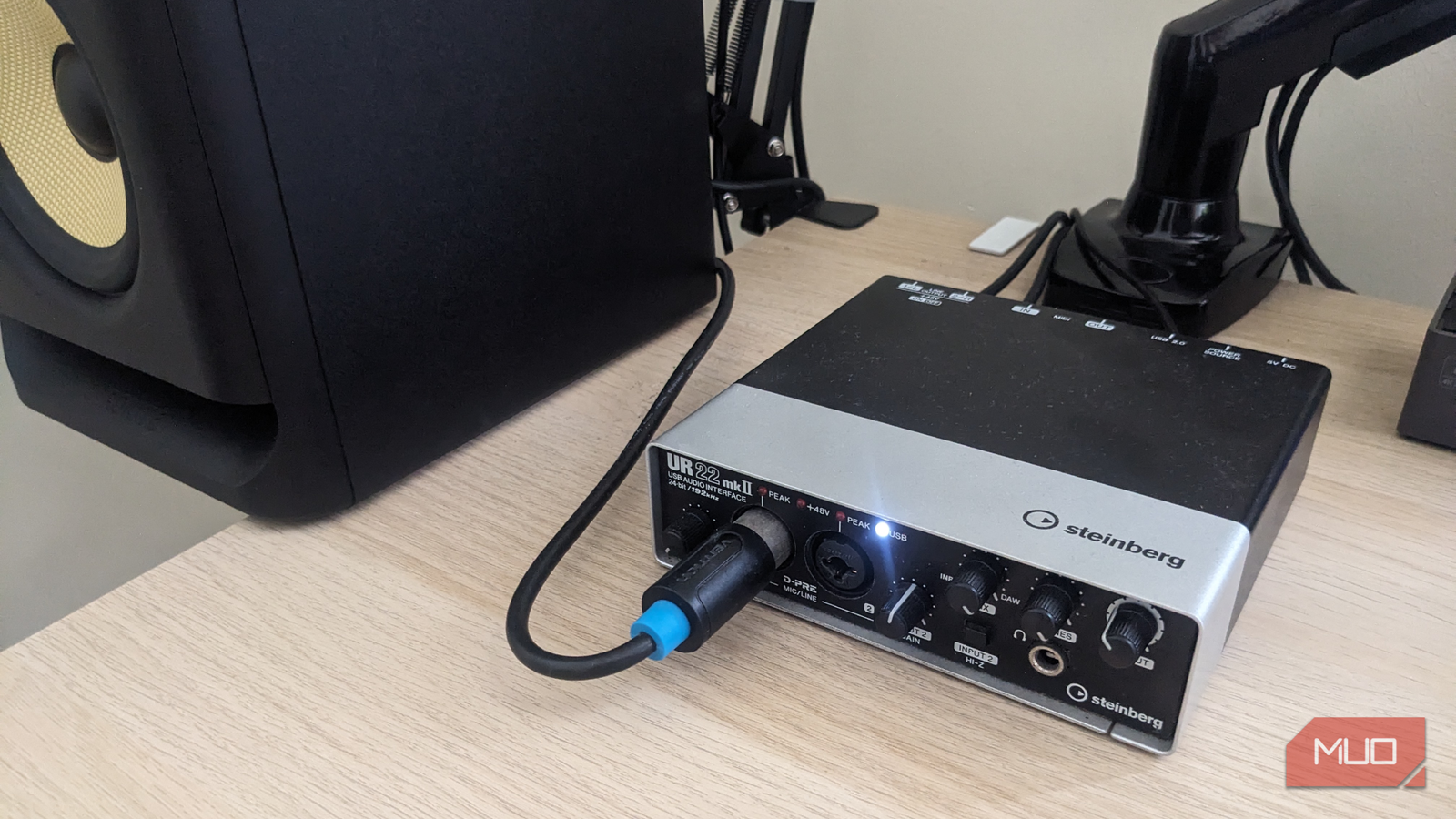
I went ahead and bought a used Steinberg UR22 mkII audio interface, and everything changed. This is a no-frills model that has been in production for many years, and it seemed like a good, solid workhorse that wouldn’t break the bank. After months of daily use, I now believe it is one of the best PC upgrades I have ever made.
How I Upgraded My Home Audio Setup Without Spending Much
You can make your audio so much better, and it doesn’t have to cost a month’s wages.
A cleaner sound made everything more enjoyable
Easy setup, with better clarity, lower noise, and more detailed audio

The setup was simple. I connected it to my PC via USB, connected the outputs to my active monitors (though it also has an excellent headphone preamp), selected it as the source for my audio input and output, set the format to 192,000 Hz, and I was off to the races. Suddenly, everything sounded so much cleaner. Music suddenly had more separation between instruments; vocals sounded more natural, and subtle details became easier to hear.
This clean signal was evident in the noise floor. My motherboard audio produced a slight background hiss through my active monitors, especially at higher volumes. The UR22 eliminated that almost entirely. This is likely because the audio circuitry is housed externally and isolated from the electrically noisy environment inside a PC case, so interference from components like the GPU and power supply became far less noticeable.
The microphone quality upgrade was massive
Built-in preamps made my voice recordings sound professional

One of the main reasons for buying an audio interface was to build a professional microphone setup as part of my digital audio workstation. This not only appealed to the aspiring rock star within me, but would also come in handy for podcast projects, video narration, and even online meetings.
Using an XLR microphone instead of a standard headset mic completely changed how my recordings sounded. Voices came through with far more depth, less harshness, and significantly reduced background noise. This was made possible by the UR22’s phantom power support, which supplies 48V to my condenser mic, yielding results that far outweigh my vocal talents and greatly expanding the possibilities of my modest office studio.
Physical controls and reliability are just…better
Dedicated hardware controls were surprisingly convenient
While I fully expected a boost in audio quality, something that didn’t occur to me when I purchased an external sound card was the convenience factor. The UR22 includes physical knobs for headphone volume, monitor output, and microphone gain, and those controls quickly became something I rely on every day.
Instead of constantly opening audio menus, I can adjust levels instantly with a quick turn of a knob. That may sound minor, but it genuinely made my setup feel more professional and enjoyable to use, and I’m not left yanking wires when something feeds back to the point where I think my speakers will blow. I also noticed how reliable everything has been since buying the external sound card, as operation has been completely stable, with no conflicts or dropouts since I first switched it on.
Do most of us really need one?
Built-in motherboard audio can be genuinely impressive
All this raises the question of whether an audio interface is absolutely necessary. To be fair, modern motherboard audio is much better than it used to be. Many gaming motherboards now include decent DACs, improved shielding, and support for high-resolution playback. To someone who primarily uses inexpensive speakers or basic gaming headsets, the difference between built-in audio and an external interface may not feel dramatic.
There’s also the question of practicality. An external sound card adds clutter to a desk setup, occupies USB ports, and is neither portable nor aesthetically pleasing. For casual users who mainly watch videos or occasionally play games, the extra complexity (and expense) may not feel worthwhile. Also, the rest of the audio chain matters. Unless you are planning to upgrade your headphones and speakers, an external sound card won’t magically improve your overall sound quality.
The long-term improvement justified every dollar spent
For me, the Steinberg UR22 mkII was worth every dollar. I didn’t buy it with the intention of achieving audiophile-grade perfection or turning my home into a hit factory. It was a simple PC upgrade that I hoped would improve the overall user experience, and it did. In spades.
Everything sounded cleaner, the microphone quality improved dramatically, and the physical controls made my setup more enjoyable to use every day. What’s more, the interface solved problems I didn’t fully realize existed until they disappeared, including background noise, weak microphone inputs, inconsistent audio quality, and inconvenient software controls.
If sound quality is important to you, whether you spend hours listening to music, gaming, or even watching YouTube videos, an affordable external sound card like the Steinberg UR22 mkII can genuinely make a noticeable difference. After making the switch, I consider myself well and truly converted.