



I have a bit of a confession to make: I am a human packrat. My phone storage is stuffed with video files, and it’s become a chaotic jumble of random MKVs, old ripped DVDs, and home movies with incredibly unhelpful filenames.
For the longest time, I just defaulted to one of the best video players for Android: VLC. We all do, right? It is the utilitarian workhorse of the media world. It plays everything, handles every codec under the internet, and never disappoints. However, using it always felt a bit sterile to me. It gets the job done, but looking at a stark list of filenames doesn’t exactly get you hyped for a movie night.
Then I stumbled across Nova Video Player. I honestly can’t remember how I found it (actually, maybe a random Reddit thread or a suggested app deep in the Play Store), but it was an epiphany. It’s an open-source app that took my messy, disorganized hoarding and somehow transformed it into what, to me, looks and feels like a premium streaming service.
- OS
-
Android
- Price model
-
Free (open-source)
Play your videos beautifully with NOVA Video Player. This open-source media player automatically organizes your library and supports a wide range of formats with smooth playback.
Instead of a glorified file browser
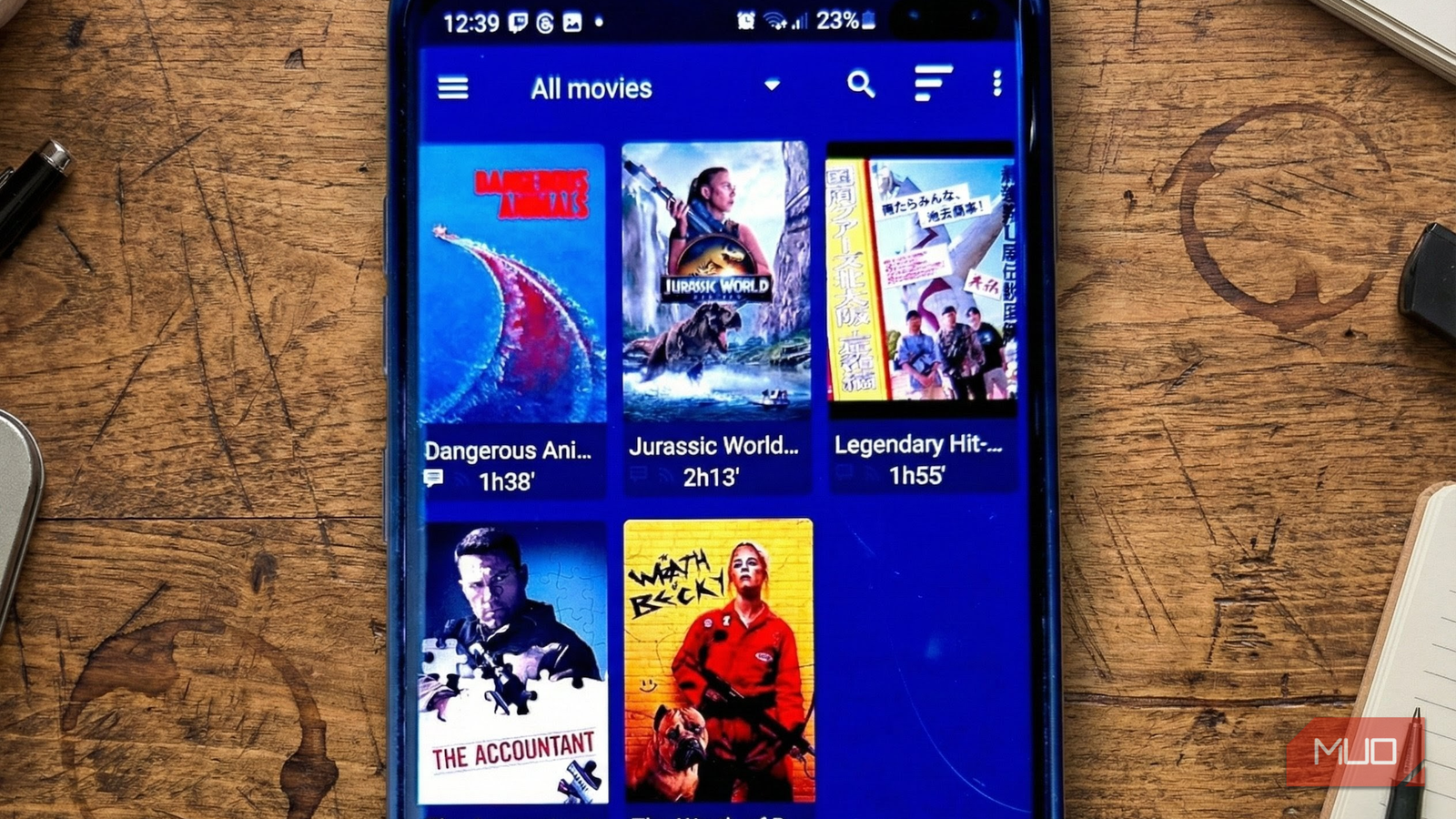
Unlike most video players that scan your device and dump everything into a chaotic list, Nova Player actually organizes your content intelligently. The app automatically scraped metadata for all my movies and TV shows. Instead of seeing cryptic filenames, I had proper movie posters, cast information, plot summaries, and even trailers—all pulled from TMDB and IMDb. The interface transformed from a file browser into something that resembles Netflix or Plex.
The organization extends beyond aesthetics. Nova separates movies and TV shows into distinct sections, with the latter intelligently grouped by series and season. You can browse your entire collection visually, or sort by year, genre, duration, rating, or jump to recently added content. The folder browser demonstrates Nova’s ability to navigate complex storage hierarchies, presenting internal storage, external SD cards, and network locations in a single unified view. There’s even integration with Trakt to track your TV shows, which syncs your watch history and lets you pick up where you left off across devices.
One of my favorite touches is the sheer depth of the metadata. Beyond just the pretty pictures, it gives me the nitty-gritty technical details I secretly love. Right on the movie overview screen, it displays the file path, resolution, file size, frame rate, and the specific codec. Nova supports virtually every format you are likely to encounter, including video codecs like H.265/HEVC, VP9, MKV, MP4, AVI, and WMV. This extra context creates an immersive experience that lets you linger on a title before watching it. There is also a dedicated Trailers tab that pulls related videos from YouTube, such as official trailers, TV spots, and interviews, so you can build anticipation before pressing play.
If you keep larger files on a NAS or shared folders on a PC to save space on your phone, Nova handles that just as gracefully. Its Network section supports SMB, including the faster and more secure SMBv2 protocol, as well as UPnP media servers and remote shortcuts. In practice, this means you can stream a 20GB movie wirelessly from your computer to your phone without hiccups. Nova treats it exactly like a local file, indexing it, fetching metadata, and adding it to the poster wall as if it lived on your device.
It offers granular control for endless customization options
A pretty face with a serious engine underneath

The good thing is that none of this complexity leaks into the day-to-day experience. Playback controls stay exactly where you expect them: play, pause, skip, and volume (though the slider is on the left side of the player screen). When you do need finer control, options like audio sync, screen rotation, and playback speed are neatly tucked into the overflow menu in the top-right corner.

The playback controls go deeper than most casual users would expect, yet they remain accessible. Nova supports audio passthrough, a crucial feature for getting the best sound from your soundbar when connecting to external speakers or AV equipment. You can force audio passthrough even when the codec isn’t explicitly supported by your receiver, giving you more flexibility in your setup.
If your device has a high-refresh-rate display, there’s an automatic refresh rate switch that adapts the screen to match your video’s frame rate, eliminating judder. The app also supports Dolby Vision alongside standard codecs, and you can force software decoding if certain videos don’t play correctly with hardware acceleration. Finally, the “Preferences” menu is a treasure trove for tweakers, and so Nova lets you toggle almost everything.

120Hz LCD vs. 60Hz AMOLED Display: Which Is Better?
When you’re buying a budget or a mid-range phone, you’ll need to choose between a high refresh rate screen and an AMOLED panel. We’ll help you decide.
Nova Player makes video watching feel premium
In an ecosystem dominated by subscription services and ad-supported apps, Nova Player feels like a breath of fresh air. It’s free, open source, and respects your privacy while delivering features that rival those of commercial alternatives.
Since making the switch, I haven’t opened another video player. Nova handles everything from my downloaded movies to network streams with equal aplomb. If you’ve been settling for a mediocre video player experience, give Nova a try. It might just become your new default, too.