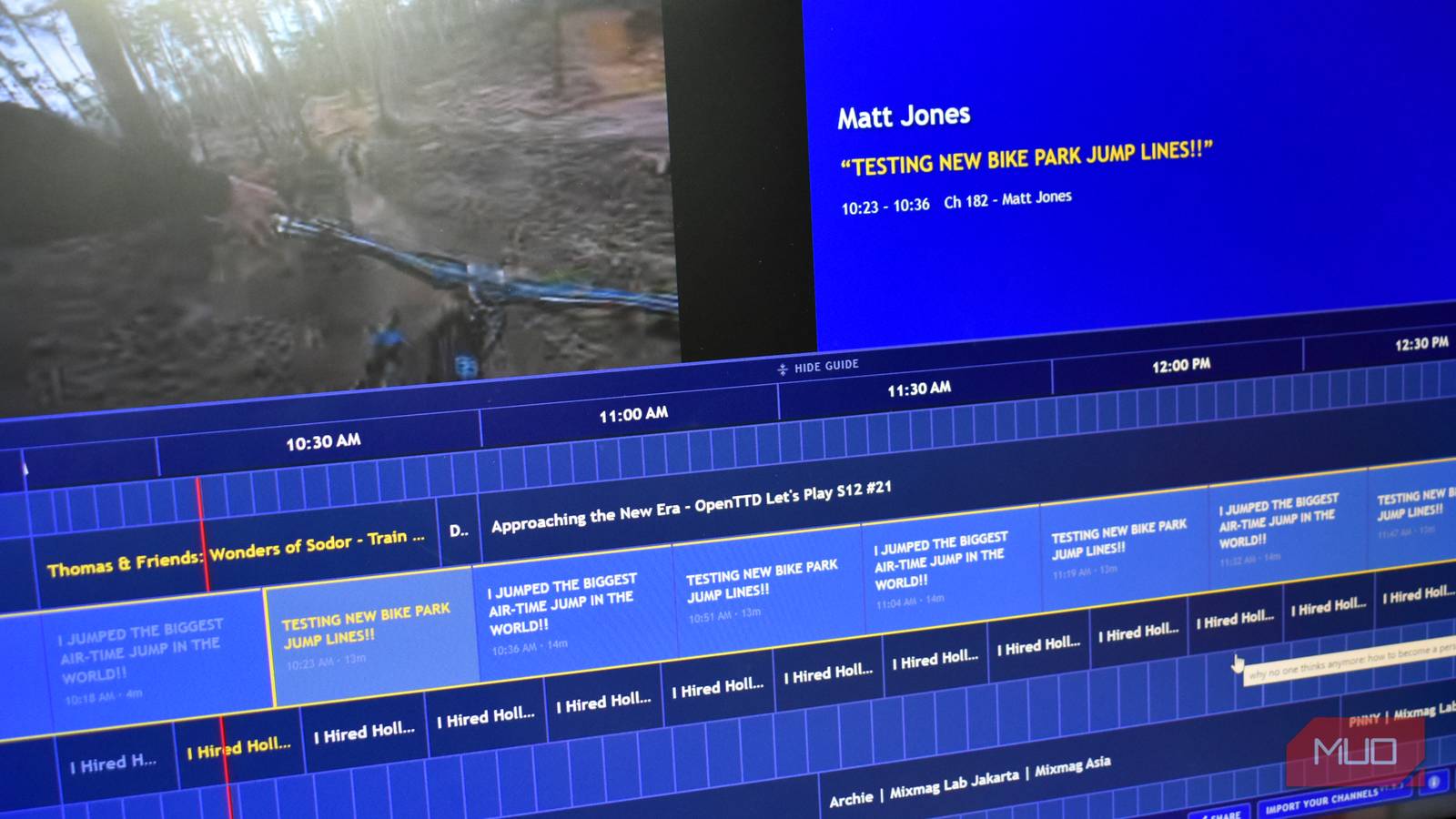





There is a new way to watch YouTube, and it might be my favorite of all time. It turns YouTube into a full cable experience that even looks like an old cable UI, complete with scanline effects similar to your old, chunky CRT TV, and best of all, it’s completely free.
Channel Surfer is a surprisingly fun alternative to watching YouTube on the site itself, and making the switch to its list of 20+ channels comes with another big benefit: no advertising interruptions.
YouTube is cable, and it’s surprisingly awesome?
It’s a different way to watch
Channel Surfer is a web app launched by London-based developer Steven Irby, who, in a bid to promote his newsletter, decided to develop 25 ideas in 25 weeks. Channel Surfer is number 20 and is one of the best.
It basically turns YouTube into a classic cable TV viewing experience, with a full channel list, integrated video (with optional scanline effect for those CRT vibes), and the ability to add your own streams.
Just like cable, when you select a channel, the YouTube video playing just continues as normal, rather than on the platform where each video starts from the beginning. Then, you can scroll along and check out what’s coming up, but importantly (and again, unlike YouTube), you can’t jump forward in time.
If you want to watch, say, the NBA’s Top 10 Plays of the Night scheduled for 10:15 AM GMT, you have to wait for the show to start. Of course, there is no reason you can’t jump over to YouTube itself and find the video, but it rather defeats what makes Channel Surfer such a fun experience.
Irby launched Channel Surfer in early March 2026, and it was quickly picked up by entertainment sites worldwide. But Irby hasn’t stopped development of Channel Surfer and has brought new features to the YouTube-cable platform.
7 video sites that are better than YouTube
If you’re done with YouTube, here are the best alternatives you should try.
For example, version 1.4.1 rolled out a toggle to hide holiday-based content when out of season, and version 1.5 introduced a “Party channel with live viewer messages.” There is also the option to import your own channels, which is a nice touch.
What I find most interesting is that, as far as I can tell, I’m not seeing any adverts from the cable channels. I’m not entirely sure how this works, but it’s refreshing to watch YouTube without adverts, so that’s another plus.
Import your YouTube subscriptions to make custom cable channels
Does this defeat the object of the app?
One of the problems I have with YouTube is that my recommendations become unified over time. I frequently see similar videos, and videos from creators I once enjoyed aren’t recommended to me anymore unless I actively seek them out and remind YouTube that I still want to see them.
- Select Import Your Channels from the menu at the bottom of the screen.
- Input your email address. This was designed to grow Irby’s newsletter after all.
- Drag the bookmarklet to your bookmarks bar.
- Now, open your YouTube Subscriptions page using the provided link. Once there, press the Channel Surfer bookmarklet you just moved to the bookmarks bar.
- All being well, it should automatically create a JSON file that will appear when it returns you to Channel Surfer. Press Import.
The newsletter is worth signing up for — I’ve had some great, unique websites sent to my inbox, and it’s a proper reminder that the weird and wonderful internet is still out there. It’s just hidden from our view most of the time.
This creates an individual channel for each of your existing subscriptions, bringing their content into Channel Surfer.
I really like this feature, but it needs a little refinement. It would be great if it merged the content into a proper channel for your subscriptions rather than a long list, since that can be a little overwhelming depending on how many subs you have.
Grouping content together into channels would be a nice touch. For example, I follow a few different mountain bike channels, so turning that into the “Mountain Bike Channel” would be great. Similarly, turning the various music channels and DJs into a custom music channel would be fun.
Then, some channels appear not to import correctly, and only show one video. I like watching Ben’s Gadget Reviews, but I don’t want to watch his DJI Avata 360 Review on repeat.

Why I’ve Started Watching YouTube on My TV Instead of My Phone
Apparently, most viewers now watch YouTube this way.
Turn boring YouTube into the cable of your childhood
For a quick, week-long project, Irby has come up with a really fun and engaging experience. I’ve really enjoyed flicking between the channels and finding shows to watch, and seeing some sports and whatnot that I probably wouldn’t have seen otherwise.
Channel Surfer hits that old-school, watching late-at-night cable nostalgia vibe perfectly, and it has the potential to go further with some more tweaks and features. I know I’ll be tuning in!