



As our homes increasingly become rammed full of tech, smart lights have become hard to ignore. Bluetooth LED bulbs, Alexa-controlled lamps, smart strips for your patio. They’re everywhere. It’s no surprise smart lighting has also infiltrated the TV market, and am I ever glad it has.
Though I love my LG G3 OLED, I can’t imagine watching one of the best HDMI 2.1 TVs for gaming without my Philips Hue Play HDMI Sync Box 8K. This expensive but genuinely compelling accessory has captivated me with mesmerizing light shows for over a year now, and I’m utterly smitten.
What is the Philips Hue Play HDMI sync box 8K?
A box that is so much more than a splitter
On the surface, Philips’ latest sync box is an ultra-fancy HDMI splitter. Dig deeper, though, and it’s actually a device that can bring new levels of immersion to your favorite movies and video games.
Paired with the right accessories from the Philips Hue range, the Dutch company’s sync box has made me love my already brilliant OLED TV that much more.
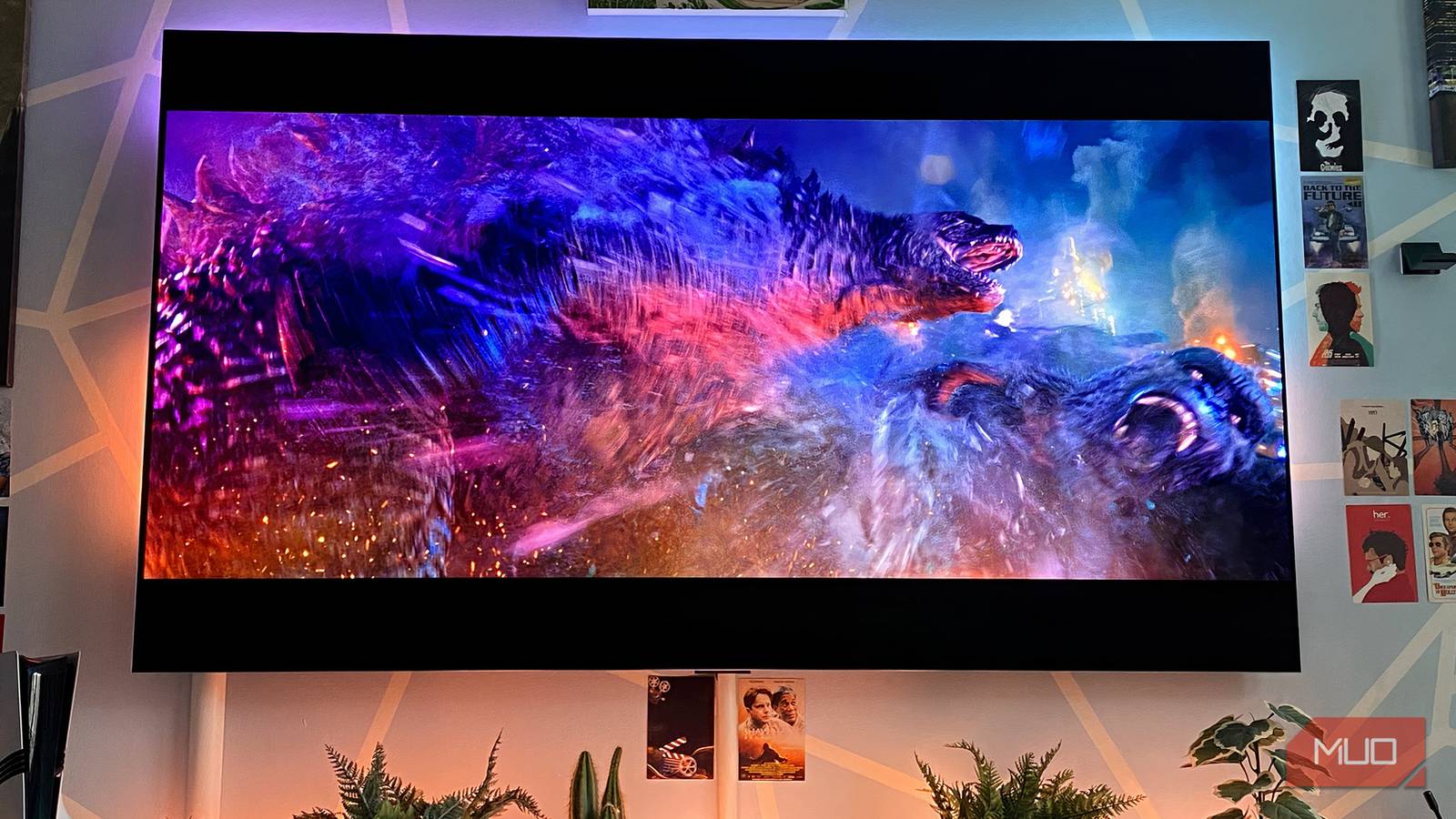
But what does this sync box actually do? Well, once hooked up to a Philips Hue Gradient TV Light Strip, which attaches to the back of your TV, the colors of whatever on-screen content you’re watching are cast onto the wall behind your screen.
I’ll admit that having a constantly morphing blend of colors shimmering behind a TV may not be to everyone’s taste. If you cast your eyes over the photos in this piece and find the effect downright gaudy, I completely get where you’re coming from. If you’re looking for a minimalist entertainment setup, the Philips 8K sync box definitely isn’t for you.
Philips’ AV accessory is about as subtle as a 50-foot gorilla swiping at biplanes from the top of the Empire State Building. At its highest ‘extreme’ level, which can be adjusted after downloading the Philips Hue app, the light shows it puts on are going to dominate your living room. While I love this flashy effect, I could absolutely see why some would find it overly distracting.
You don’t need an 8K TV to enjoy this sync box
Quality 8K content is still few and far between

Chances are, you probably don’t own an 8K display, right? Fret not, you definitely don’t need one to enjoy this 8K sync box. That logic might sound backwards, but are you really surprised? After all, the amount of 8K streaming content out there remains vanishingly small. 8K TVs have a tiny level of market penetration, and that’s unlikely to change anytime soon.
The real selling point of Philips’ 8K sync box is actually its HDMI 2.1 certified status. Unlike the previous HDMI 2.0 model, which was limited to a max resolution output of 4K at 60Hz, this updated box not only supports 8K/60Hz signals, but far more importantly for this hardcore PC gamer, 4K/120Hz signals too.
A game-changer for PC titles
Lighting up my favorite Steam games
As someone who spends most of his off-hours playing Steam games on an RTX 5090-powered PC, owning Philips’ HDMI 2.1 sync box has transformed the way I experience titles. Make no mistake: HDMI 2.1 is so important for gaming. For the years I have owned its HDMI 2.0 predecessor, I never once hooked my rig up to it, owing to those previously mentioned 4K/60Hz restrictions.
Now that this new iteration supports 4K/120Hz, though, I’ve actually moved my PC from my home office into my living room — that’s how much I love the flashy light output of this 8K sync box.
In the last couple of months alone, some of my favorite recent Steam games have become even more immersive thanks to Philips’ gadget.
Scaling the titular, downright dizzying peaks of Cairn as the frosty expanses are etched onto my living room walls in icy blue tones practically chills my bones. The scorching neon lights seen in the city scenes of the grim but captivating Reanimal turned my lounge into a pulsing bruise, while the diamond-green seas of gentle diving adventure Abzu made the wall behind my TV look like a shimmering fish tank.
Color syncing is also great for movies
Hue goes there?
I’ve relished connecting my PC and PS5 Pro to the Philips 8K sync box, no question. Yet it’s also been a pleasure hooking up my Apple TV 4K and Amazon Fire TV Stick 4K to the splitter. As someone who adores watching movies, shows, and docs, I can honestly say my sync box has made the vast majority of viewing experiences more enjoyable. Including this 1998 drama that predicted our future better than most hard sci-fi films.
The lush greenery of the prehistoric climates seen in Netflix’s The Dinosaurs is tailored to squeeze a colorful tune out of my sync box. While big-budget flicks such as Avatar: The Way of Water and Doctor Strange in the Multiverse of Madness feel even more otherworldly as the alien tones of their worlds seep onto my wall.
My favorite film to pair with the Philips 8K sync box, though? That has to be 2021’s Godzilla vs. Kong. Sure, it’s brainless. But whenever its iconic ape and colossal irradiated iguana are duking it out, this actioner is also hugely fun. The monsters’ titanic scrap in downtown Hong Kong is so littered with neon-dappled skyscrapers that the scene makes my lounge look like it’s been stuffed into a high-end PC; there’s so much LED action.
Is the Philips Hue 8K sync box worth the money?
A cool but expensive addition

The only reason I can’t unreservedly recommend the Philips Hue HDMI 8K sync box is that, well, it’s pretty dang expensive.
$299 is a lot to ask for some color-copying magic, and the true cost is actually a lot higher than that. You need the aforementioned Philips Hue TV Light Strip to enjoy this splitter, and they ain’t cheap. The smallest 55-inch version starts at around $150, while the 77-inch model I own normally retails for $250.
If paying upwards of $450 is an outlay you can’t justify for a synchronized light show, I completely understand. Should the Philips 8K sync box drop to under $200 in future sales, I’d make a strong case for it being a worthwhile addition for AV enthusiasts who want to make their viewing experiences more immersive. As much as I adore this gizmo, though, I can’t deny it’s a bit of a pricey parlor trick.

This is the only type of HDMI cable that actually works over long distances
If you need to cover a long distance for your video, take a look at these types of HDMI cords.