




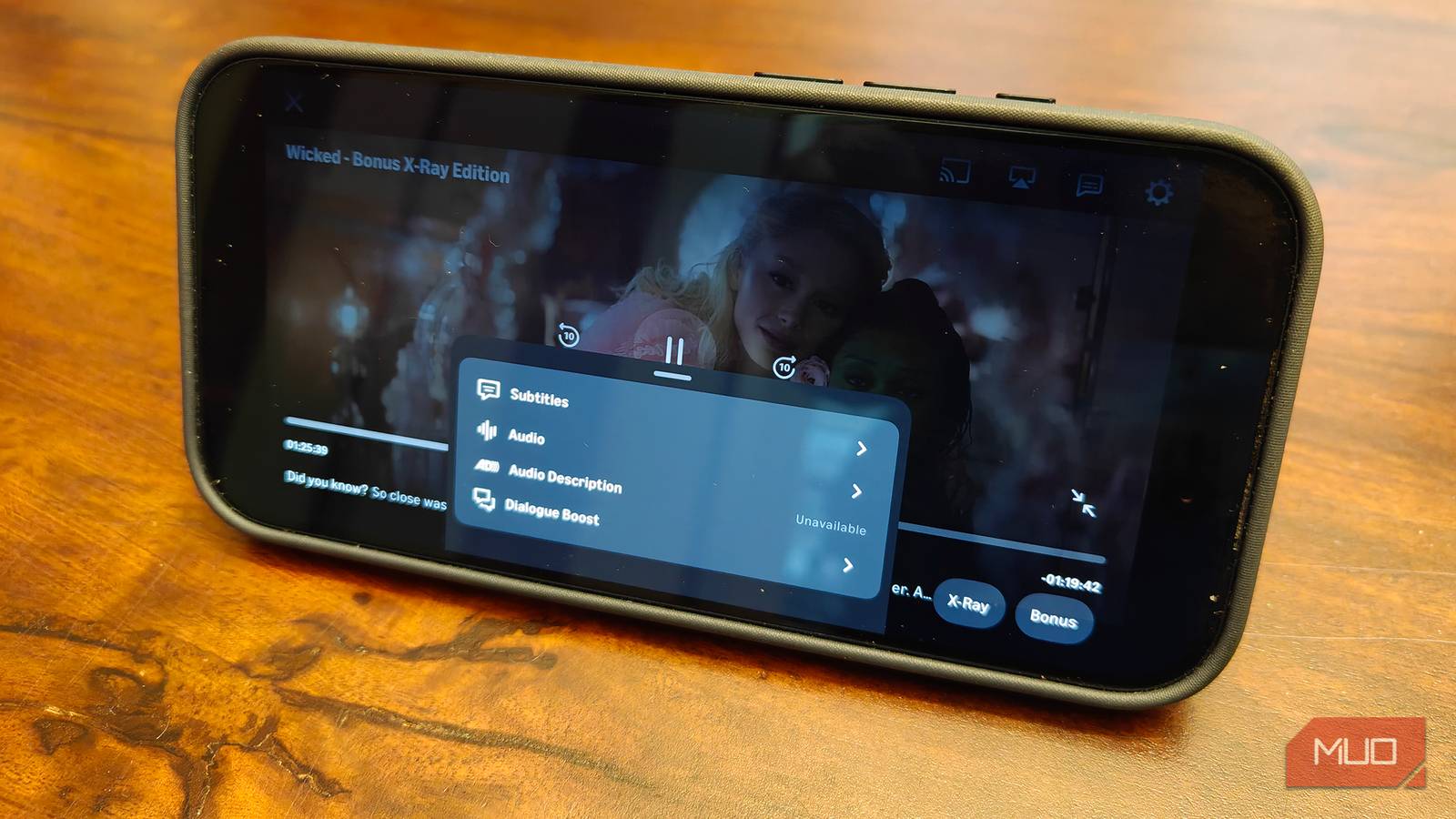
I watch a lot of TV, and I almost exclusively watch late at night. It’s tough to fit TV watching time in during the day when I’m working. In the evening, my TV watching is limited to what’s appropriate for my 13-year-old son to watch as well. Late at night is really the only time I have to indulge in guilty pleasures and mature shows. This is challenging, however, when it comes to certain shows, like action series, dramas, and thrillers, that flip back and forth from quiet, dialogue-driven scenes to loud, booming ones with explosions, car chases, gunshots, and music soundtracks.
Certain AV gear, including speakers, receivers, and even TVs themselves, have features to combat this audio imbalance. But there’s also a quick and simple way to address this with Amazon Prime Video, among other tips and tricks for the streamer. It’s a feature called Dialogue Boost.
5 ways to make your soundbar sound better instantly
Unlock the full potential of your soundbar with these simple tweaks.
How Amazon Prime’s Dialogue Boost works
Enhance conversations without boosting all audio

The Amazon Prime Video Dialogue Boost feature is AI-powered, meant to enhance speed and clarity so you can more easily hear dialogue over louder background music and other sound effects. It works by analyzing points in a show or movie where dialogue could be difficult to hear above loud background music or effects. It then isolates the speech patterns and enhances the audio so that dialogue is clearer. To activate Dialogue Boost, select the Audio settings button when a title is playing, scroll over or down to Dialogue Boost, and select “Medium” or “High” to turn it on.
Since the feature uses AI, it differs from traditional dialogue-boosting methods, which typically rely on general amplification of the central channel. Because of this, it also means you can enjoy the feature wherever or however you’re watching. This means on your TV, laptop, tablet, or even smartphone.
Dialogue Boost is available for popular Amazon Prime Video shows like The Boys, Gen V, Fallout, Jack Ryan, The Marvelous Mrs. Maisel, and most other Amazon Originals. You can find it on other titles available to stream there as well. I’ve verified it for non-original shows like Chicago Fire, The Vampire Diaries, and The O.C., and even movies like Elf, Kill Bill, and Back to the Future. But some titles don’t include it, like Bridget Jones’s Diary and the series Mom. In some cases, this may presumably be because they don’t necessarily need it. But as long as you see the option in the menu, you can use it for that title.
My experience with Dialogue Boost
A game-changer for late-night binge-watching
To test the feature, I put on an episode of Fallout Season 2, a show that I know has constant switches between loud and quiet moments. In fact, while watching Season 2, I wore the Sonos Ace headphones and used the TV Audio Swap feature so I could crank the audio without having to constantly toggle the volume.
Activating Dialogue Boost created a much nicer balance in the audio. I was able to hear Justin Theroux talking, for example, while a man’s head exploding right after wasn’t deafeningly loud. Whenever the ’50s music soundtrack kicks in, which it does consistently through scenes in every episode, the sound is also more nicely balanced. It’s a game-changer of a feature that you might find more useful in some titles than others. But when it works, it works well.
There’s both a Medium and a High setting, as noted, but you’ll logically notice the most significant difference when using the High setting. For those who just want a subtle conversational boost, however, Medium suits well. Dialogue Boost is one of the cool things you can do with Amazon Prime Video, and one of the most useful audio tweaks.
Who would use Dialogue Boost
From hearing impaired to parents

While I find Dialogue Boost valuable because of my late-night TV viewing habits, helping prevent me from keeping others in the family up with the loud volume just so I can hear what’s being said, it’s useful for many others, too. Those with hearing difficulties will appreciate the better balance of sounds. If you’re watching poorly mixed content, this feature can help improve the watching (and listening) experience. For some, it also means being able to remove subtitles, another thing I often do so I can follow dialogue without having to raise the overall volume.
Launched way back in 2023, Dialogue Boost is one of those quietly useful features that some subscribers don’t realize is available. But once you turn it on and realize the benefits, chances are you may end up using it for every title where it’s available. Dialogue can be whisper-quiet in some shows, even in ones that aren’t action titles; loud soundtrack music, whether hard rock or romance tunes, can be significantly louder than dialogue. With this feature, you can keep everything balanced so that what the characters are saying is just as prominent, no matter what else is going on in a scene.
Amazon Prime Video is one of the TV streaming services that offers the most value, thanks in large part to the fact that when bundled with an Amazon Prime subscription, it also includes fast and free delivery on thousands of items ordered via Amazon, access to special sales, Amazon Music, cloud storage, gaming, and more.