




It didn’t take the original iPod much time to become a cultural phenomenon soon after its launch in 2001. The slogan “1000 songs in your pocket” is what made it an instant hit. Eventually, iPhones and Androids replaced iPods for most people, but some still love them and continue to use their old music players to this day.
However, it was the original iPod interface that played a big part in their popularity. While Apple has stopped producing iPods, you can bring the classic iPod-style music player to your Android phone using ClassiPod. It’s a free, open-source music player that offers the signature click wheel and minimal interface, and doesn’t cost a cent.
Classic iPod interface
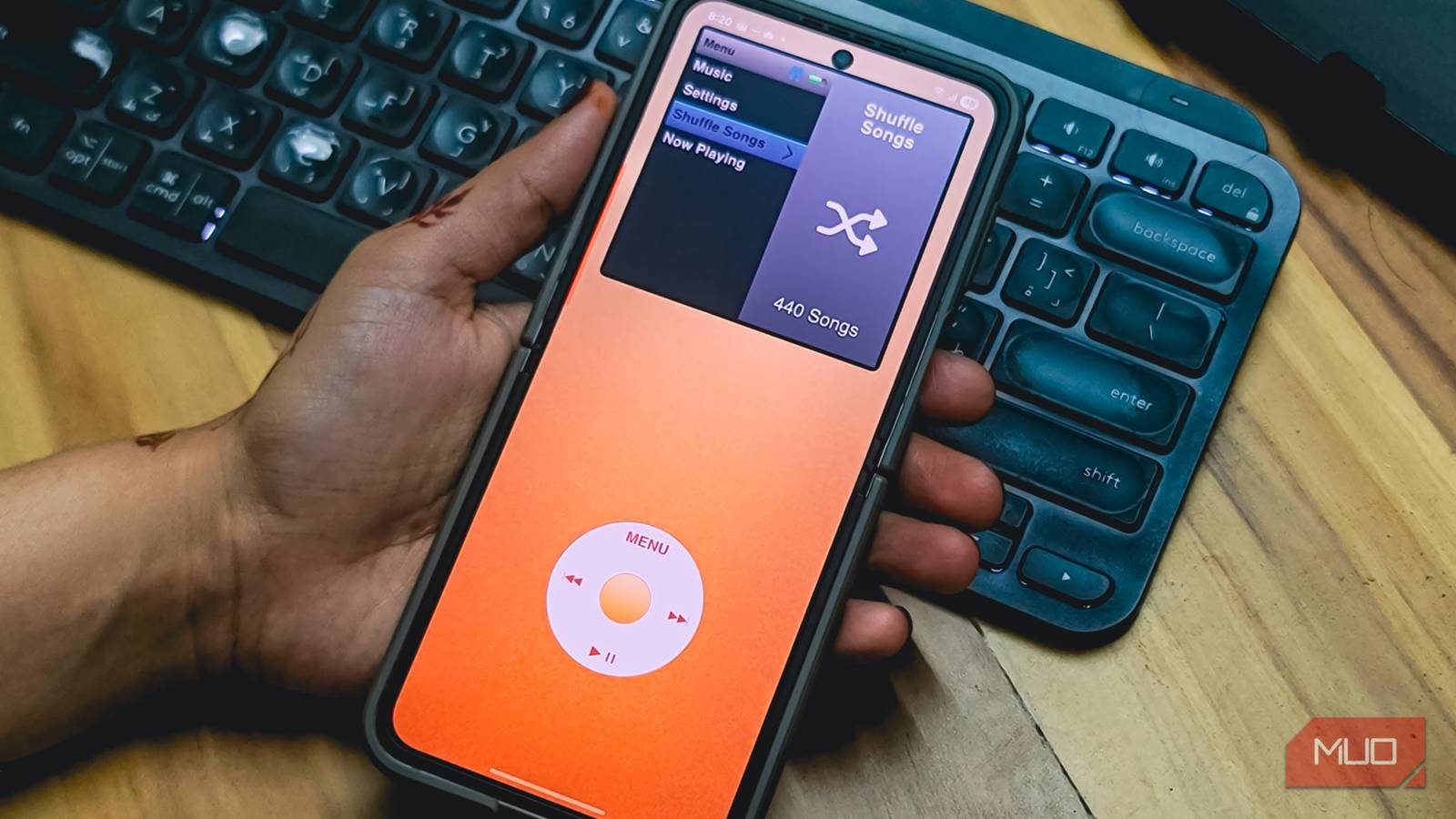
Signature iPod interface with a click wheel
ClassiPod tries to replicate the iPod experience by offering a clean and minimal interface. It’s free and open source, though you can donate to the developer to support continued development. The screen is split into two parts: the top area shows the classic iPod display, and the bottom houses the virtual click wheel.
Navigation works much like the original iPod. You scroll the ring to move through menus, press the center button to select, and hit the Menu button to go back. The app runs through a guided tour when you first open it, but if you’ve ever used an iPod, you’ll feel right at home. There’s even a Cover Flow view that lets you browse albums by scrolling horizontally through album art, just like the later iPod models.
The top display area is also touch-enabled by default, so you can tap to select items instead of relying entirely on the wheel. It’s a nice modern touch that doesn’t take away from the retro feel.
Local music playback
Offline compatibility and background play

ClassiPod is an open-source app that runs completely offline. There’s no streaming integration or connection to Spotify, Apple Music, or any other service. ClassiPod focuses entirely on music files stored on your device, making it a solid pick if you prefer apps built for large local libraries.
The app automatically scans your storage and displays all detected music files in the classic iPod-style menu. You can browse by artists, albums, songs, or playlists. If you add new music after installing the app, there’s a rescan option in Settings that picks up the new files. You can also exclude specific directories if you want to keep certain folders out of your library.
Playback continues in the background when you leave the app, so it works like any normal music player while you use other apps. The now-playing screen gives you play/pause, skip controls, and long-press seeking within a song. You can also adjust volume by swiping on the click wheel, and there’s a shuffle and repeat option accessible through the playback menu.
Lots of customization
Change the interface and background theme
ClassiPod lets you customize the look of the music player with different device colors, including silver and black options that mimic the original iPod hardware. You can also adjust the click wheel size between three presets to match your hand or screen size, and change the sensitivity to control how fast it scrolls through menus.
The app supports haptic feedback, so each scroll tick and button press gives a subtle vibration. You can also enable click wheel sounds, though you may need to turn on system tap sounds in Android settings for them to work.
For a more immersive experience, enable immersive mode to hide the Android system bars, making the interface feel more like a full-screen classic iPod. You can also disable split-screen mode so it looks like a standalone retro device rather than a modern multitasking app. If you’ve ever wanted to turn your Android phone into a minimalist music player, ClassiPod sure gets you close.
Where it lacks
Some rough edges remain

ClassiPod has some issues that can be annoying. The most common problem is the app getting stuck on the Scanning Music Files screen, especially after adding new songs. As a workaround, you’ll need to force stop the app and clear data to get it working again.
There’s no built-in equalizer to fine-tune the audio output, which is a miss for anyone who likes to adjust bass or treble. You also can’t select a specific music directory manually, meaning the app scans your entire device and only lets you exclude folders, not include specific ones. If ClassiPod doesn’t detect your music for some reason, there’s no workaround. It also misses out on lyrics support, but that’s expected on an iPod retro app.

- OS
-
Android
- Price model
-
Free
Classipod is a retro-style local music player that revives the iconic iPod Classic experience with a click wheel interface, customizable themes, offline playback, album art display, and intuitive navigation for your music library.
ClassiPod offers the classic iPod experience on your phone
ClassiPod won’t replace a full-featured music player if you need equalizers, folder selection, or streaming integration. But that’s not really the point. It’s a nostalgia trip that works surprisingly well for casual listening, especially if you have a local music collection and miss the simplicity of the original iPod interface.
If you grew up with an iPod and want to relive that experience on your Android phone, ClassiPod delivers. It’s free, open source, and captures the essence of what made the iPod special—a clean interface, a click wheel, and nothing else getting in the way of your music.